Cover Image
You just watched a demo. Someone typed "a mobile banking app where users can split bills" into a text box and, twelve seconds later, had seventeen screens of polished UI. Buttons, navigation, transaction flows. It looked done. It looked really done.
So what does that mean for you?
The honest answer: it means the prototyping pipeline is changing, and the "best UX tools" conversation from 2023 is starting to feel as outdated as "should we use Sketch or Adobe XD?" The tools are evolving faster than most teams can evaluate them. And the thing that keeps getting lost in the excitement is the distinction between tools that genuinely make UX work better and tools that just make faster-looking garbage.
This guide maps what the landscape actually looks like in 2026. The tools worth knowing about, the AI layer that's genuinely useful versus genuinely overhyped, and the questions worth asking before you add another subscription.
The UX Prototyping Landscape Has Changed — Here's What's Actually Different
Three things have shifted the prototyping world in ways that old "best tools" lists don't reflect.
The AI layer is now embedded, not separate. A year ago, AI in UX tools meant a handful of plugins you bolted onto Figma. In 2026, AI is woven into the dominant tools themselves — Magic Write in Figma, AI-assisted layout in Framer, auto-layout suggestions across every major platform. You don't have to choose an "AI tool" separately. If you're using Figma, you're already using AI.
The design-to-code pipeline is real. This is the bigger shift. Tools like Locofy, v0 (Vercel), and Builder.io can take a Figma file — or even a text prompt — and generate production-ready React, Swift, or Kotlin. Not mockups. Code. This changes what "prototype" means: it's no longer just a communication artifact. In some workflows, the prototype is the starting point of the shipped product.
The no-code question has a real answer now. For years, the debate was theoretical. In 2026, Framer, Webflow, and Bubble have enough maturity and enough real-world case studies that you can actually evaluate: when does shipping a functional prototype make sense, and when does the "Bubble ceiling" bite you?
These three shifts are the lens for everything below.
What AI Actually Changes (And What It Doesn't)
Before the tool list, the most important distinction that every UX professional needs to internalize:
AI compresses execution. It does not compress thinking.
You can generate seventeen screens of polished UI in twelve seconds. What you cannot generate in twelve seconds is the research insight that tells you those seventeen screens solve the wrong problem. The AI doesn't know your users. It doesn't know your business model. It doesn't know which edge case will cause your support team to melt down at scale.
Where AI genuinely accelerates UX work:
- Ideation speed — generate layout variations, explore visual directions, produce copy and content without staring at a blank canvas
- Low-fidelity to mid-fidelity compression — turn a rough wireframe sketch into a structured layout almost instantly (Uizard, Galileo AI)
- Design system maintenance — AI can audit whether components are being used consistently, flag deviations from token libraries
- Accessibility auditing — automated contrast checks, alt text suggestions, ARIA label generation
Where AI currently overpromises:
- Strategic direction — AI can generate variations of what you tell it to build; it cannot tell you if you're solving the right problem
- Context understanding — domain knowledge, organizational constraints, and user research insights don't live in a model
- Edge case identification — the most important UX insights usually come from understanding the 5% of users who break your assumptions
- Ethical judgment — what the AI generates often encodes the assumptions of its training data, not your ethical commitments
The practical implication: if your design process skips user research, strategy, and contextual understanding and goes straight to polished screens — AI will make that skipping faster and more confident. That's the risk, not the benefit.
The Tools Defining 2026: Beyond the Standard List
Figma — Still the Center of Gravity
Figma hasn't stood still. The 2026 version has AI woven through it — Magic Write for generating copy inside design files, AI-assisted auto-layout suggestions, improved Dev Mode for developer handoff, and a growing set of AI-powered plugins for everything from generating realistic data to auditing accessibility.
For prototyping specifically: Figma's component variants, interactive overlays, and conditional flows handle the majority of mid-to-high-fidelity prototyping needs. The Inspect panel gives developers a workable starting point. The plugin ecosystem — Maze for testing, Stark for accessibility, Content Reel for realistic data — extends it further.
The free tier remains generous. Professional is $15/user/month, Organization adds advanced admin and security features for larger teams.
Key limitation in 2026: Performance with very large, complex files is still a friction point. And while Dev Mode improved handoff, the persistent gap between "what the prototype communicates" and "what the developer builds" hasn't fully closed — more on that below.
The AI-Native Design Tools Worth Knowing
Three tools that aren't replacements for Figma but deserve a place in your awareness:
Galileo AI — Text-to-UI generation from descriptive prompts. You describe a screen, it generates multiple layout options. Particularly useful early in ideation when you need to explore visual directions quickly without building from scratch. The output needs refinement, but as an ideation accelerator — especially for non-designers who need to communicate visual intent — it's genuinely differentiated.
Uizard — The differentiator: you can photograph a hand-drawn wireframe on paper and Uizard will convert it to a structured digital mockup. This isn't just a scanner — it understands the layout and components. For teams running workshops with stakeholders who sketch on whiteboards, this closes a real gap between physical and digital.
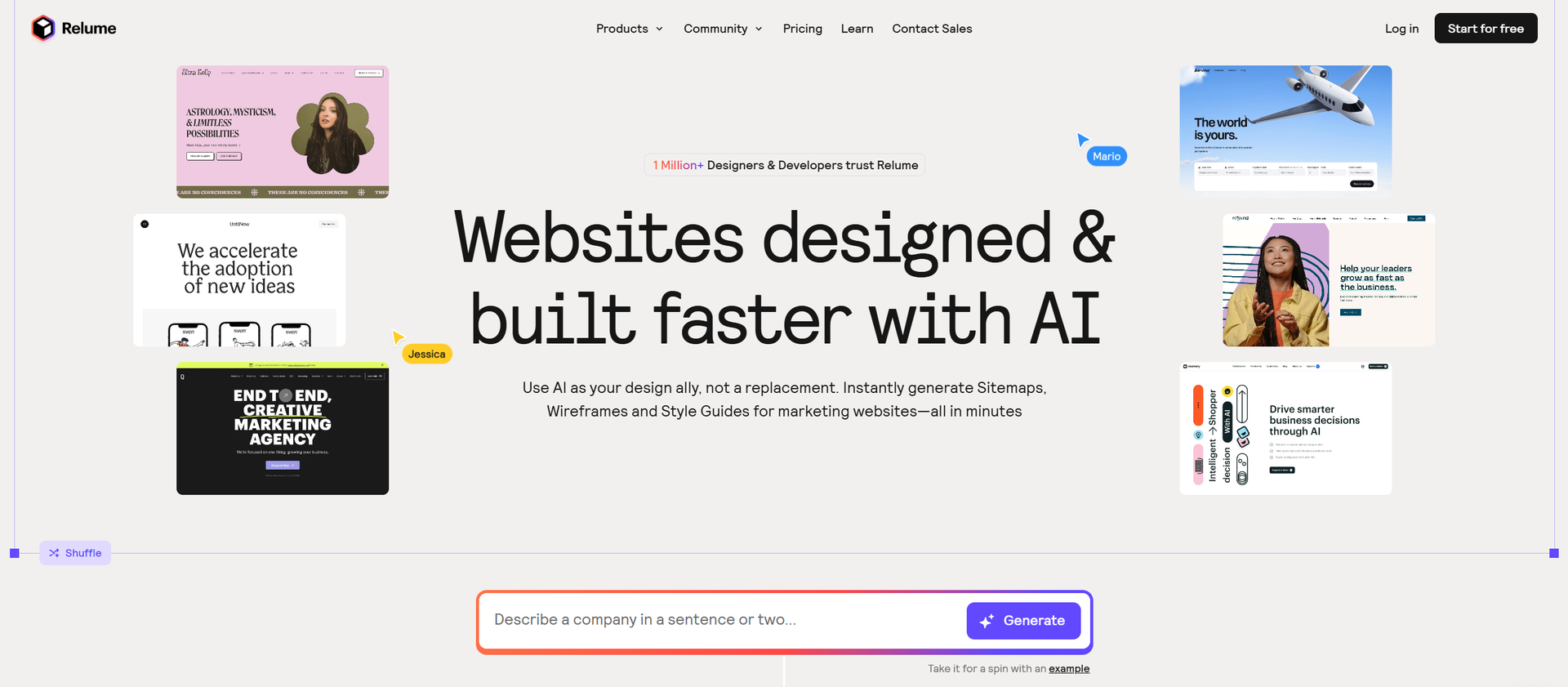
Relume — AI-powered sitemap and wireframe generation with an emphasis on realistic copy. Particularly strong for teams working in the early definition phase who need to move from IA to lo-fi wireframes fast. The library of components is growing fast.
💡 Tip: These tools are at their most valuable when used to accelerate ideation, not replace design thinking. Treat them as very fast sketch-pads, not finished deliverables.
Design-to-Code: The Most Significant Shift Since Figma Multiplayer
This is the category that deserves the most attention in 2026.
Locofy — Takes Figma or Adobe XD files and generates production-ready code (React, React Native, HTML/CSS, Swift, Kotlin). The output isn't a mockup approximation — it's code that a developer can actually use as a starting point. For teams where design-to-dev handoff is a chronic bottleneck, Locofy is the most significant tooling advance since Figma's multiplayer shipped.
v0 (Vercel) — AI-native code generation from prompts or screenshots. If you want a working React component, you describe it and v0 builds it. The quality is high for standard UI patterns; it struggles more with novel interaction design. For frontend developers working alongside UX designers, this is increasingly the fastest path from prototype to shipped UI.
Builder.io / Visual Copilot — Similar trajectory to Locofy, with stronger enterprise positioning and deeper integration into existing codebases. Particularly suited for teams that need to move from Figma to a specific code framework without losing design fidelity.
Why this matters for UX prototyping: When a prototype can become code with one click, the boundary between "prototype" and "product" dissolves. That has implications for how UX professionals work, how developers engage with design, and when teams should move from prototype to production.
The No-Code Question: When Prototype = Product
Framer, Webflow, and Bubble have all matured to the point where teams are genuinely shipping functional products that started as prototypes.
Framer — The most significant evolution. What started as a high-fidelity prototyping tool has become a near-full website and web app building platform. Designers use Framer to create production-quality sites that ship directly. The AI features — AI-assisted layout, copy generation, SEO optimization — are advancing fast. For startups and solo founders who need to validate quickly, Framer is often the right answer for "should we build this at all?"
Webflow — Matured into a full CMS and e-commerce platform, not just a design tool. The AI-assisted layout engine in 2026 can generate responsive structures from natural language prompts. Increasingly used by agencies for client sites where the client needs to manage their own content post-launch.
Bubble — The "Bubble ceiling" is real and well-documented at this point. For web app MVPs before product-market fit, Bubble remains the fastest path to a working product without code. The 2026 AI-assisted workflow features have improved. But teams that achieve traction almost universally face the migration question: Bubble doesn't scale well for data-heavy, complex applications. The migration to custom code (React, Next.js) is a recognized industry service.
The honest framework for this decision:
Situation | Tool |
|---|---|
Validate an idea quickly before building | Framer (web) / FlutterFlow (mobile) |
Client needs to own and edit content post-launch | Webflow |
MVP for a web app before PMF | Bubble |
Post-PMF, need to scale | Custom code (Figma → Locofy → developer) |
The Handoff Problem Is Still Not Solved
Here's the one problem that every new tool promises to fix and none of them fully have: the persistent gap between what a prototype communicates and what a developer actually builds.
Figma Dev Mode helped. Developers can pull CSS values, inspect spacing, extract assets, and read prototype flow documentation in context. It's better than the old days of screenshots in a Slack channel.
But the gap persists because prototypes abstract away decisions that developers have to make concretely. How does this button behave when the API returns an error? What's the loading state when the network is slow? What happens to this layout when the user is on a 320px screen with a system font size of 200%? These are implementation questions that prototypes communicate poorly regardless of how good the Inspect panel is.
Design-to-code tools (Locofy, v0) are the most serious attempt yet to close this gap — because they generate actual code, not specifications for code. The quality of that code is uneven, and it still requires developer review and refinement, but the direction is right.
The honest reality: some handoff problems require conversation, not better tooling. The best design-dev handoffs happen between designers and developers who have an ongoing relationship, not just a shared file. Tools help. Relationships help more.
💡 Pro tip: If you're a designer working with developers, the single highest-leverage thing you can do for handoff quality is to walk through your prototype interactively — not just share a file link. Ten minutes of synchronous conversation eliminates hours of misinterpretation.
The Honest Bottom Line: What Actually Matters in 2026
Most designers and product teams in 2026 are drowning in tool subscriptions, AI features they've never used, and workflow anxiety about whether they're falling behind. This is the noise.
The signal is simple: the best UX prototyping workflow is the one your team actually uses consistently, that produces thinking (not just screens), and that closes the loop between what you design and what your users experience.
A practical starting point for 2026:
- Figma as your primary design and prototyping tool — it covers the most ground, has the best collaboration, and integrates with everything
- AI assistance as a speed layer, not a thinking replacement — use it to generate copy, explore layout variations, audit consistency; don't use it to skip research and strategy
- Locofy or v0 if you have developers who are bottlenecked on design-to-code handoff — evaluate whether the output quality meets your bar
- Framer if you're validating a web product and need to ship fast
- Bubble if you're pre-PMF on a web app and need to learn from real users
- Everything else only if you've hit a specific wall — tool subscriptions compound; add them only when you have a defined problem they solve
The landscape will keep shifting. The tools that survive the hype cycle are the ones that solve a problem you actually have. Everything else is noise.
Stefan Tran
Tek lover