Cover Image

Overly animated sites can make a simple task harder to follow. The case for restraint does not need a claim about what is currently top-ranked on a forum: accessibility guidance and a performance trace give you concrete reasons to review the motion.
The checkable facts behind the verdict are not glamorous, and they are enough. The American Migraine Foundation reports vestibular migraine affects up to roughly 3% of adults and is the second most common cause of vertigo. WCAG has a criterion, 2.3.3 Animation from Interactions, that says interaction-triggered motion must be disableable unless it is essential. Check current browser support for prefers-reduced-motion and test the settings on your supported devices. The off switch exists, the standard exists, the affected users exist, and still the hero section spins.
Think of animation like seasoning: the right amount disappears into the dish, and too much is all anyone tastes. This post makes the restraint case with accessibility guidance, performance checks, and a practitioner position you can read, then ends with a framework for deciding what earns motion and what doesn't.
💡 Tip: This post argues when not to animate. For the technique side, read the best animated UI libraries, Magic UI vs React Bits, and the kinetic typography guide.
Key Takeaways
Vestibular migraine affects up to roughly 3% of adults and is the second most common cause of vertigo (American Migraine Foundation). Screen motion is a documented trigger.
WCAG 2.3.3 requires interaction-triggered motion to be disableable unless essential, and
prefers-reduced-motionprovides a way to respond to the user’s motion preference.Animation dependencies add download and execution work. Measure the version and imports used by your production build; this article does not establish a measured bundle-size comparison.
transformandopacityare useful starting choices for compositor-stage animation. Confirm the actual rendering work in a browser trace.Four questions decide what earns motion: does it communicate, respect the off switch, stay on the compositor, and would the page be worse without it?
The strongest argument isn't taste. It's medicine.
Why over-animated websites make users sick
The real prevalence numbers
Vestibular disorders disrupt the balance system, and screen motion is a documented trigger: parallax backgrounds, auto-playing carousels, scroll-jacked transitions, and large-area kinetic type can provoke dizziness, nausea, and migraine in sensitive users.
Be precise about how many users that means, because the numbers in circulation are sloppy. The American Migraine Foundation puts vestibular migraine at up to about 3% of adults and calls it the second most common cause of vertigo overall. That is the defensible figure. The prevalence of vestibular migraine should not be treated as a count of everyone who may be sensitive to screen motion.
What WCAG 2.3.3 actually requires
The W3C's Understanding Animation from Interactions page is the primary reference. Motion animation triggered by interaction must be disableable unless the animation is essential to the functionality or the information being conveyed. Note the level: AAA, not AA. This is an AAA criterion; it is not an AA requirement. Apply the conformance level required for the project, and consider reduced-motion support as a practical accessibility measure.
The same page explains the reasoning in W3C's own terms: motion that simulates a vestibular trigger can set off symptoms in people with vestibular disorders, so the standard gives those users a way to turn it off.
The mechanism is free
The platform already ships the off switch. MDN documents prefers-reduced-motion as a media feature with two values, no-preference and reduce, that detects the operating system's reduce-motion setting. Caniuse shows support from Chrome 74, Edge 79, Safari 10.1, and Firefox 63 onward, with coverage depending on the browser versions your audience uses. The implementation pattern is define-then-override:
/* Motion by default, stillness on request: the baseline pattern
every animated component should ship with */
.card-enter {
animation: slide-up 0.4s ease-out;
}
@media (prefers-reduced-motion: reduce) {
.card-enter {
animation: none;
}
}
Where teams fail isn't ignorance of the query. It's treating it as progressive enhancement to add later. Wire it into the component from the start, or the retrofit never ships. Accessibility load-bearing, taste secondary.
Health aside, motion has a payload cost that compounds.
Every animation library is weight you chose
Animation libraries add dependencies to a page. Compare the compressed output of your actual build, including the imported modules and package versions, rather than using an unversioned package-size estimate. Download size and runtime work are separate measurements; inspect both before choosing a library.
Which properties you animate matters more than which library
The deeper cost is which properties you animate. The browser can animate transform and opacity at the compositing stage. web.dev’s animation guide recommends those properties where possible and using DevTools to check the actual rendering path. Animating width, height, top, left, or margin can trigger layout or paint work. Profile the actual effect rather than assuming every property change has the same cost. Same visual intent, different architecture, so check the properties and render work produced by the chosen implementation.
The rule that follows: animate compositor-only properties by default, justify anything else per case, and lazy-load the library or reach for CSS-only motion before importing tens of kilobytes for a fade-in. Weight is a design decision with a number attached.
Cost established, the craft question is what restraint looks like in practice.
The practitioner position: purposeful, optional, removable
One primary practitioner resource is Val Head's "Making Motion Inclusive," a talk on motion accessibility delivered at An Event Apart and published as slides on Notist. Her core position, in terms you can implement: reduce does not equal remove. Keep the motion that carries meaning, strip what triggers symptoms, and give users both the OS signal (prefers-reduced-motion) and an explicit in-page toggle, because relying on the OS setting alone misses people who never found it.
This is where the contrarian framing earns itself. This site's own library coverage, best animated UI libraries and the Magic UI vs React Bits comparison, exists because animation technique matters. The argument here is not against the tools. It is against reaching for them by default: the kinetic hero, the scroll-triggered everything, the parallax background that nobody reads faster because of. The kinetic typography guide shows the technique done with intent; the technique still needs a purpose in each project.
Restraint needs a decision procedure, not just an attitude.
A framework: what earns motion
Four questions, asked in order, for every animated element on the page:
Does it communicate? Motion that signals state change, guides attention to new content, or confirms an action earns its place. Motion that decorates a static message does not.
Does it respect the off switch? If the component has no
prefers-reduced-motionpath, it is unfinished regardless of how good it looks. Ship the override with the animation, not after it.Does it stay on the compositor?
transformandopacityby default. Anything layout-triggering needs a written reason, not a shrug.Would the page be worse without it? Delete the animation in dev tools and compare. If nothing is lost, no information, no orientation, no feedback, then it was seasoning poured over an already-seasoned dish.
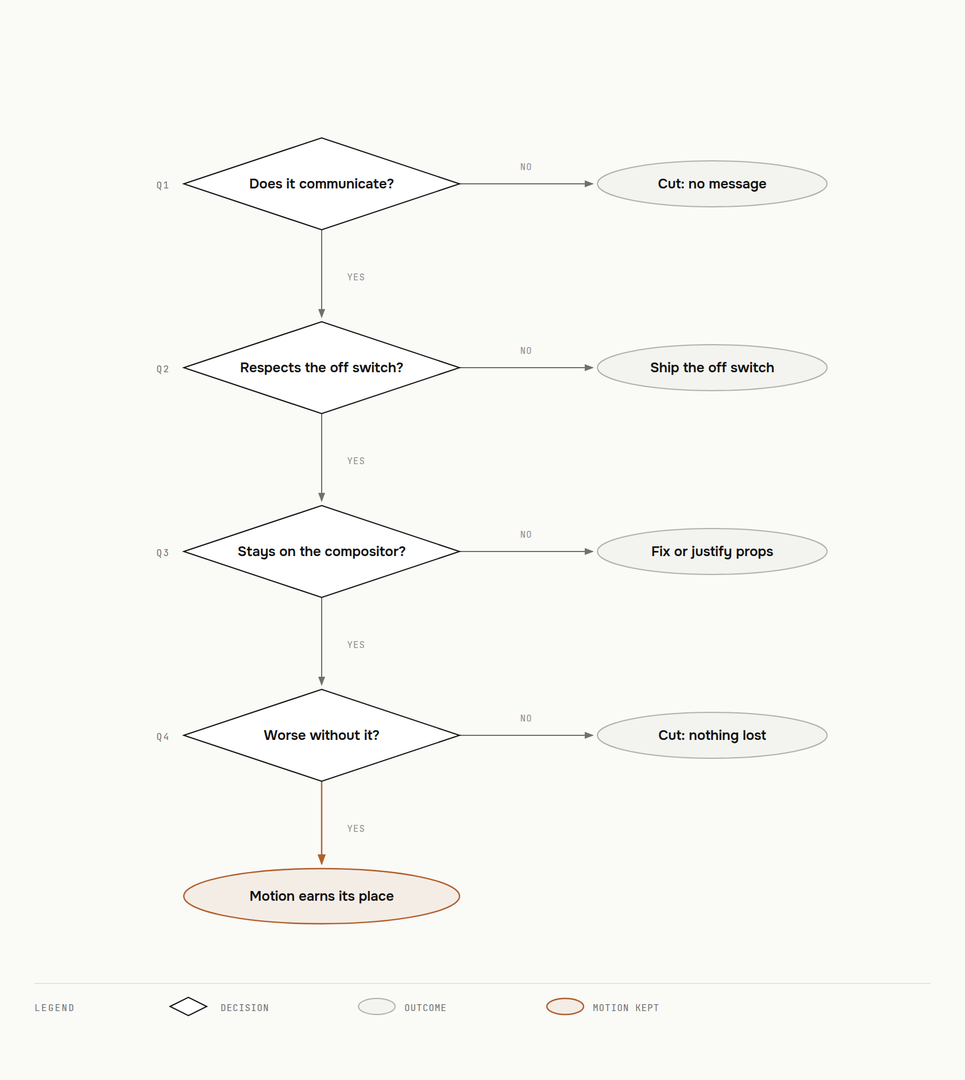
Run the current project through this filter. If an animation fails the first question, reconsider it before spending time on its implementation.
Conclusion
Over-animated websites persist because motion is easy to add and hard to evaluate. The evaluation exists. WCAG 2.3.3 at AAA requires a disable path unless the motion is essential, up to roughly 3% of adults live with vestibular migraine alone, avoiding unnecessary layout and paint work can improve animation performance, and the verifiable practitioner position, Head's most of all, is purposeful and optional motion. Four questions decide what stays.
Open your homepage, disable animations in dev tools, and compare. If the page reads better still, the motion was never design. It was decoration billing itself as craft.